




Earlier this week, Apple held its WWDC 2013 Keynote. Featuring news about Macs, iOS X Mavericks, and iOS 7 for iDevices, Apple revealed many new developments focusing on deepening its ecosystem. While the news about Macs and iOS X Mavericks was interesting, I honed in on features relating to the iPhone and iPad. Our own Chris Ferrell did an excellent summary of the specs of iOS 7, but there are a few aspects of the Keynote I noticed Mr. Ferrell did not cover.
After displaying a bunch of impressive stats about the company, Boris Sofman came on stage. Boris is the CEO and co-founder of Anki. Started with two other PhD graduates from the Carnegie Mellon Institute, Anki has the goal of bringing a new category of experiences to the iOS platforms and developers. Boris presented Anki Drive, an app that controls a small car. What is revolutionary about Anki Drive is that the car can learn and adapt; it is smart A.I. Anki Drive is a new way to experience a video game. On a flat pad, Boris placed three small cars; the cars raced, responding in real time to each other. He then introduced a red car to the mix, a car with the instructions to win at any cost. By being aware of the surroundings, the red car used all the tricks it had to win. While watching cars race around an oval track in my living room isn’t that exciting to me, I can see other applications of Anki. I would like to see the technology applied to miniatures used in RPGs like Dungeons & Dragons. Watching my rogue backstab goblins or a mage take out a dragon has more appeal to me. It was fascinating to see an iPhone send messages over Bluetooth to physical characters of a game; you input a command, and the physical entity actively decides how to carry out those commands. The Anki Drive app is available now; chapter one describes the process and the science in more detail. No official release date was announced.

Coming this fall are improvements to iCloud. The draw of iCloud has been the storage of music, apps, photos, contacts, documents, and calendars. Also, you can use iCloud to find your devices. You will be able to save your projects created in any iWork program, Pages, Numbers and Keynote, and access the projects from any device that has the programs. If you start a presentation in Keynote on your Mac, you can save it to iCloud, and then access the presentation on the iPad version of Keynote. I don’t own a Mac, but I can still use iWork on my PC by accessing iCloud. If I start a spreadsheet in Numbers on my iPad (or iPhone), I can complete the work by signing into iCloud on my PC (Internet Explore and Chrome work best) because any changes will automatically appear no matter which device I’m using. Currently, each iWork program is $9.99.

iCloud Keychain will allow users to store their passwords. The passwords will be encrypted, so you can safely store passwords on one device and use on others. If you don’t want to come up with a password, Keychain will make suggestions; you don’t have to remember the suggestion because Keychain will remember it for you. Improvements to sharing photos are coming as well. Currently, Photo Stream lets you share your photos with your devices. iCloud Photo Sharing will let you share your photos easily with others in your photo stream. Add friends and family to a shared photo stream so any member of the photo stream can share pictures and video (up to five minutes long) instantly.
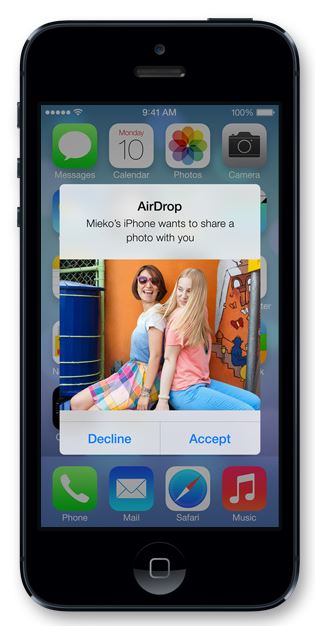
Another way to share photos, videos, contacts and other things will be AirDrop. If someone is next to you, you can tap on the person or persons you want to share with. The sharing happens by Bluetooth and Wi-Fi, so you don’t have to bump phones with anyone—this being an obvious dig at the Samsung phone. When you share something with a neighbor, a notice appears on the person’s device, and the receiver can accept or reject your offering. AirDrop is for sharing with others next to you, and if you don’t want to get anything from anyone, you can make yourself invisible in the Control Center.
iOS 7 promises to be a sleeker and faster iOS with new looks to all icons, no more green felt in Game Center, a smarter Siri (with the option of a male voice) and revamps to current Apple apps. Apple states that many have been working hard to improve Maps with better, accurate directions, areas of interests, and estimated travel times. The App Store will have a section for kids and be better organized. Siri will have a new interface and be able to answer more questions because it will be connected to an encyclopedia and Bing. There are numerous changes coming with iOS 7, making it feel like we are getting a new phone. I do agree with Chris about iOS 7 coming with the release of a new iPhone. Apple plans to release new Macs as well, so it looks like the fall will see many new Apple machines on the shelves just in time for the holidays.
The main message I got from the Keynote was ease. Apple wants us to use its devices and apps because they are intuitive and integrate smoothly into our lives. We won’t have to worry about our photo libraries being a mess because iOS 7 will know where we were when we took our photos and be organized by place and time. We won’t have to remember passwords because Keychain is there. Maps vows to not get you lost. iCloud will keep all of your stuff. Apple is creating a deep ecosystem with tendrils that tie your computer to your iPhone and to your iPad, encircling you in a comforting embrace. The new features coming with iOS 7 have convinced me to stay with my iPhone and iPad. Yes, I confess that I’ve looked elsewhere, but Apple’s announcements seduced me to remain loyal. I know I’m deep in Apple territory, and I admit that as long as Apple keeps making systems that are easy to use, make tasks quicker, and work with my PC, I’ll be in Apple’s jungle for quite some time.
